



RECODER Pedal Elements
RECODER

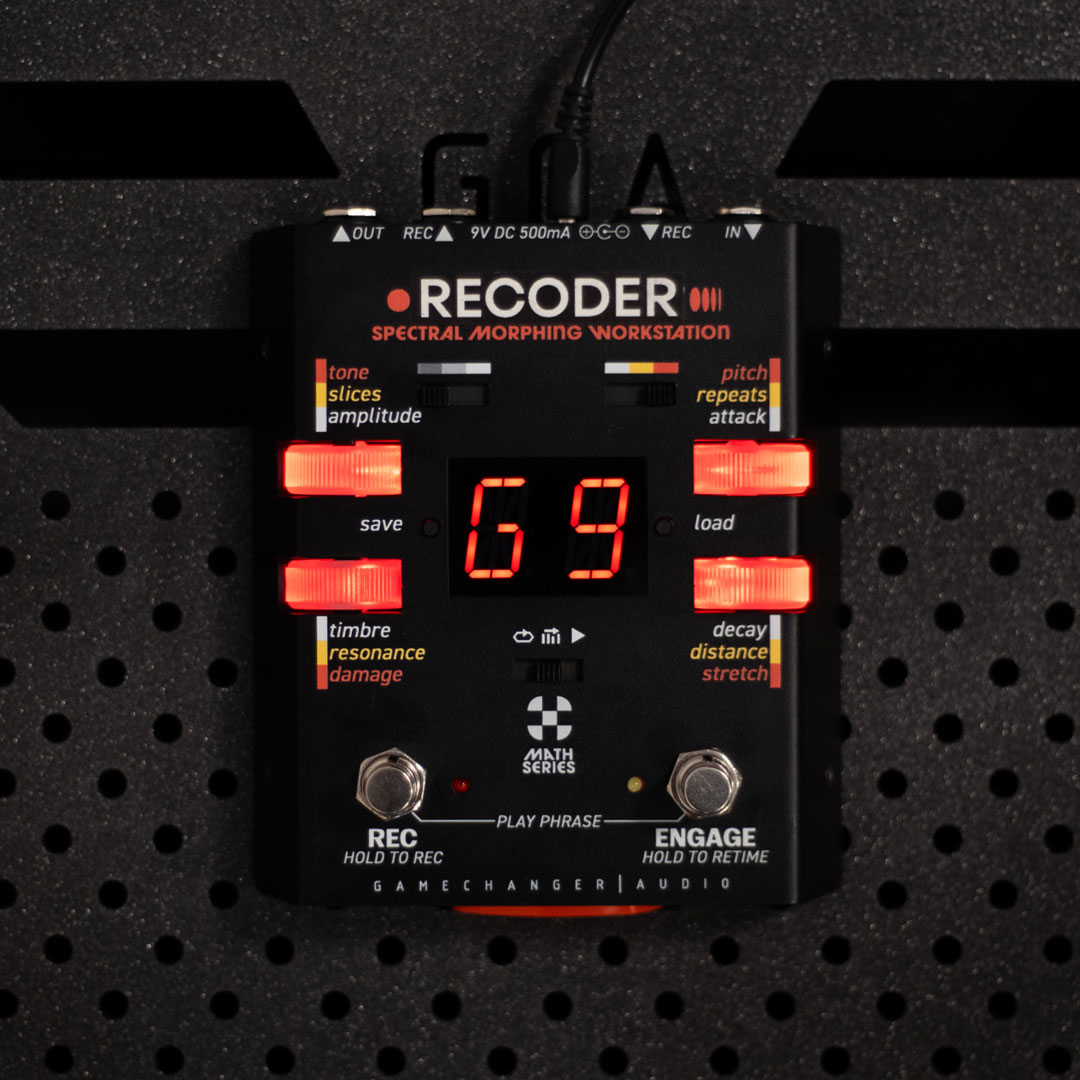
THE RECODER
ENG
MATH
The RECODER is a new kind of musical tool that lets you turn any recorded phrase into a living, breathing unique audio effect:
Record any sound, a riff, a melody, a beat, a hiss, a glitch — and use the RECODER to imbue your dry signal with various properties of the “spectral donor”:
You can call it a Cross-Pollinator, a musical Prism, a ghostly Vocoder, a Formant Shifter, a Granular Echo Creator, or a Sound Imprint Machine…
We named it a SPECTRAL MORPHING WORKSTATION, but honestly – even we don’t fully know what it is yet – because it is specifically designed to sound different in every player’s hands.
LET’S ROLL THE DICE
RECODER is a deterministic phrase-morphing processor.
It analyzes any recorded audio snippet — extracting its spectral envelope, transient markers, resonance clusters, amplitude contour, and formant distribution — and uses that data to modulate, imprint, or generate entirely new signals from your live input.

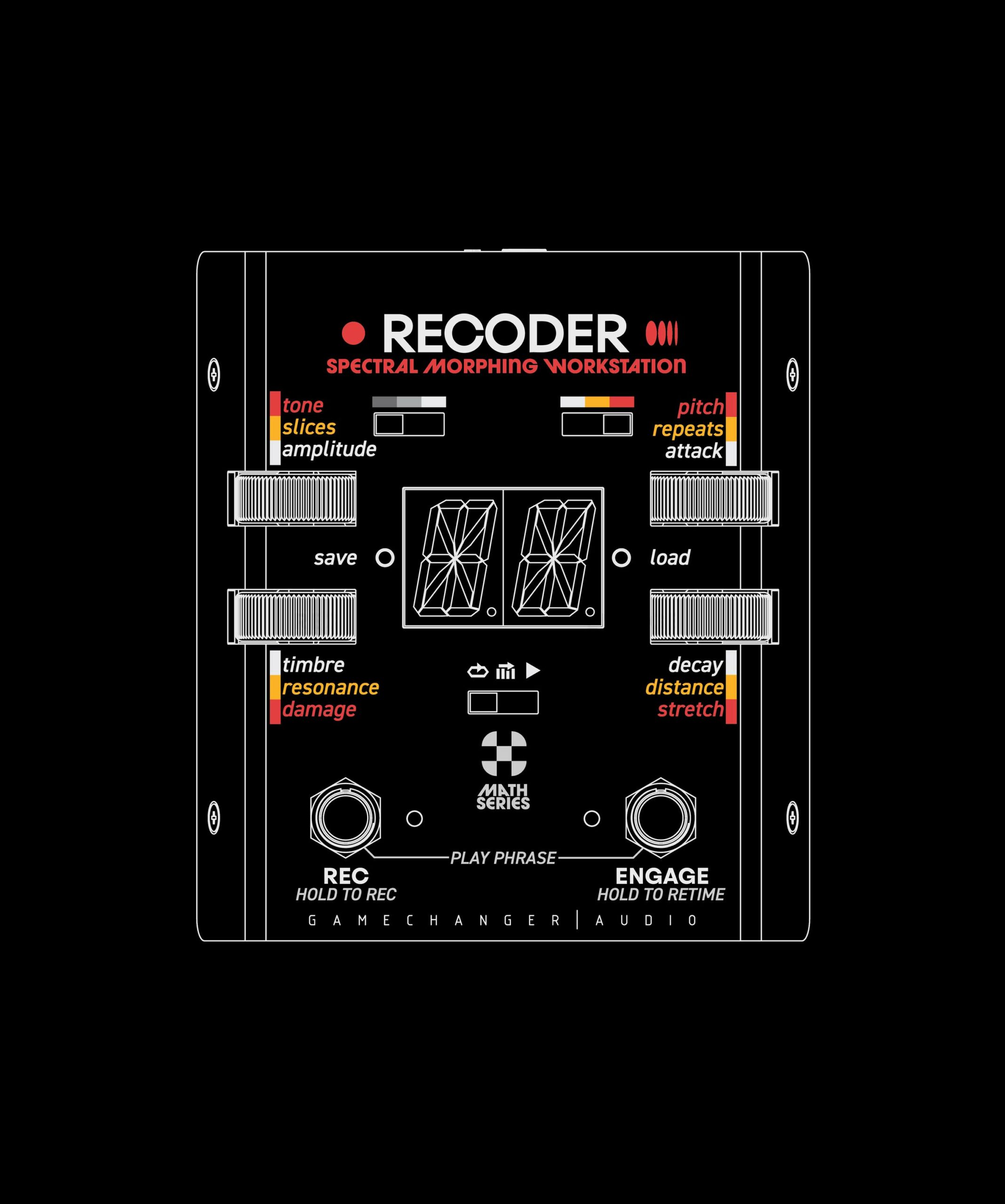
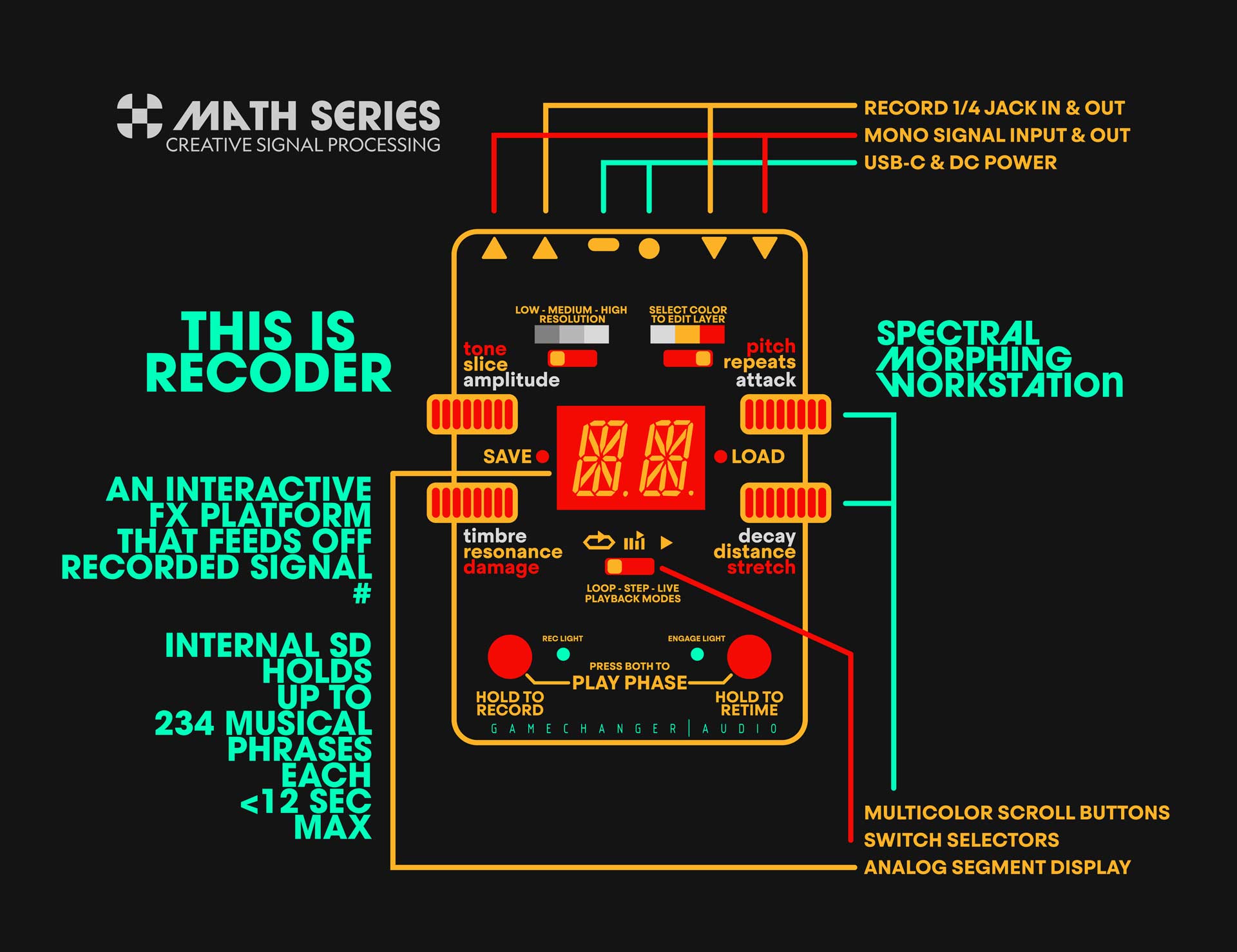
HOW IT WORKS
ENG
MATH
At its core, the RECODER is designed for single-input recording and processing. Plug your instrument into the Main Input — guitar, synth, voice, drum machine, acoustic pickup, modular — and you can do absolutely everything:
1. Record a phrase by holding down the REC footswitch – the maximum length is 12 seconds;
2. See it being captured on the circular LED display;
3. As soon as you release the REC Footswitch – the phrase will start looping inside the memory buffer; after release;
4. Play your instrument through the phrase — and watch your live signal get interpreted, reshaped, filtered, sliced, and harmonically re-mapped – or RECODED – through that phrase…
Every phrase you capture can be saved permanently inside the pedal, stored in one of 234 memory slots –
along with all its customized parameters, layers, mangles, and mutations.
Short recordings (50–200 ms) behave like spectral filters, resonators, or timbral imprints;
Long recordings become living rhythmic maps, transient machines, vowel vocoders, spectral landscapes, ghost riffs inside your clean sound.
SAMPLE DURATION BEHAVIOURS:
|
Sample Length |
Behavioral Role |
DSP Function |
|
50–200 ms |
Static spectral identity |
Timbral imprint, resonator, filter |
|
500–2000 ms |
Transitional modulator |
Formant warp, dynamic filtering |
|
4–12 sec |
Behavioral landscape |
Rhythmic convolution, transient-based slicing, spectral terrain |
MEMORY ARCHITECTURE:
- 234 storage slots (phrase + DSP state container)
- Each slot stores: audio waveform, transfer profile, mutation state (pitch, stretch, damage, tone, resonance, etc.)
- USB-C access for renaming, external phrase import, archival storage
NOW HOW ABOUT THAT REC INPUT?
ENG
MATH
The Record Input allows you to record external donor material from a different source in real time while still playing through your main instrument. That means you can create hybrid phrases from different sources without unplugging or stopping the flow, for example:
– Play guitar while grabbing phrases from your synth or groove-box;
– Record a vocal snippet while singing and use it to filter a drum loop, etc.;
But where the REC input truly shines – is the LIVE MODE:
specifically designed to cross-pollinate instruments, pedals, synths & signals in real time.
This means that you’re no longer just playing through saved phrases — you’re feeding it new material mid-performance, constantly changing how the signals get RECODED.
The Record Input is an optional acquisition, designed for real-time source switching, hybrid phrase creation, and continuous cross-pollination between multiple instruments.
It allows you to:
- Record an external donor signal while maintaining uninterrupted live processing
- Inject new spectral material mid-performance
- Construct hybrid phrase models from multiple sources (guitar + synth, vocal + drum machine, pedal chain + modular, etc.)
- Perform dynamic modulation switching without unplugging or re-routing
LIVE MODE: Continuous Cross-Source Convolution
In LIVE MODE, the engine continuously analyzes incoming audio (from either input) and uses it as a real-time modulation source — bypassing static phrase playback.
This enables:
Continuous spectral substitution
Live-time convolution, slicing, sidechaining, harmonic mirroring
Instrument-to-instrument morphing without recording stops
Behavioral streaming instead of static looping
AND NOW ITS TIME TO FILL UP THE OXYGEN TANKS AND TAKE A DEEP DIVE INTO THE FUNCTIONS
WHITE LAYER
ENG
MATH
The White Layer is all about taking your dry signal and infusing it with the behavior, movement, and personality of the recorded phrase. There are four main controls:
AMPLITUDE: Multiband Dynamic Transfer
Turn left → it subtracts the most active frequencies (a soft, pulsating tremolo that follows the phrase’s rhythm).
Turn right → it boosts those active bands, acting like a living multi-band booster — and if pushed far, it becomes a phrase-driven multi-band distortion.
TIMBRE: Spectral Fingerprint Transfer
This control captures only the tonal DNA of the recorded phrase & superimposes it onto the input without changing dynamics.
It’s like borrowing the voice, texture, color, and grit of the phrase — and letting your playing speak through it.
Turn Left → vocoder-style imprint (grainy, glassy, responsive)
Turn Right → Additive resynthesis (cleaner, harmonic, melodic)
BANDWIDTH SWITCH: Coarse | Medium | Precision
This switch changes the WHITE LAYER’s BANDWIDTH:
how finely the amplitude & timbre engines process both signals:
LOW: Wide, chunky spectral bands; Thick, raw, lo-fi, expressive
MEDIUM: Partial spectral resolution, Balanced, musical, textured
HIGH: Full FFT spectral resolution (up to 1024 bands)
Super-detailed, surgical, spectral mapping.
Sometimes lower resolution sounds more musical.
Sometimes high resolution sounds more digital than digital.
Your call.
ATTACK & DECAY: Feel the Response Curve
These two knobs control how responsive, smooth, or sharp the transfer feels.
- Attack: how quickly the Recoder reacts to your playing
- Decay: how long it “holds onto” the phrase before morphing to the next moment
AMPLITUDE
Multiband Energy Transfer Envelope shaping, harmonic amplitude imprint:
-
Translates amplitude envelope, energy distribution, and transient clustering of the recorded phrase onto a live signal.
-
LEFT Side → Frequency-band attenuation based on donor signal activity.
-
RIGHT Side → Active-band boost, generating spectral side-drive, and phrase-driven distortion
DSP mapping equation:
LiveOutputFreqₙ(t) = DryInputFreqₙ(t) × EnergyProfileₙ(recorded, t)
ATTACK
Envelope Sensitivity Control Time-domain threshold responsiveness;
DECAY
Hold time before spectral transition between bins;
This is a behavioral smoothing tool between spectral frames — blending from single-frame imprinting to fluid response morphing.
RESOLUTION SWITCH:
Time-Frequency Granularity Control for how finely the input is sliced for transfer:
LOW~16 bands Coarse spectral mappingVintage, dirty, resonant
MEDIUM~64 bands Partial FFT decompositionMusical, smooth, articulate
HIGHup to 1024 bands Full STFT spectral reconstruction, Precision vocoding with formant analysis;
In the White Layer, dry signal is behaviorally resynthesized.
YELLOW LAYER
ENG
MATH
The Yellow Layer allows parts of the actual recorded material to start leaking into your output as an additional moving layer of sound.
SLICES: Extracting little shards of the recorded phrase

Turn Right → slices sound musical, sympathetic, harmonically aligned with what you play. Melodic, vowel-like, almost responsive.
Turn Left → slices become unpredictable, dissonant, metallic, glitchy, broken, alien — based on the differences between your playing and the phrase.
RESONANCE: Real-time harmonic blooms from the recorded phrase.
Resonance analyzes the pitch and harmonic content of your recorded phrase and creates artificial boosted resonances on top of your dry signal.
Turn Left → the resonances follow what you’re currently playing, but shaped by the phrase’s tonal DNA.
Turn Right → the resonances are locked inside the phrase, regardless of what note you’re playing – creating strange harmonic overlays that sometimes agree, sometimes fight you — sometimes sound like your instrument is being haunted.
REPEATS & DISTANCE: Time-based mutation of those slices and resonances.
Once Slices and Resonances are triggered, these two knobs decide how they behave in time.
|
Control |
What it does |
|
REPEATS |
How many times those fragments are repeated — from one single blink to long, blooming, ambient tails |
|
DISTANCE |
How widely spaced or tightly clustered those fragments are — like shattered glass vs flowing mist |
Phrase-Extractive Sound Generation
In this layer, the recorded phrase is no longer just a modulator. It becomes an active audio source that gets extracted, triggered, and reconstructed in real time.
|
PARAMETER |
DSP ROLE |
DESCRIPTION |
|
SLICES |
Spectral Triggering |
Extracts harmonic bins based on similarity / difference with live input |
|
RESONANCE |
Convolution Resonator |
Artificial resonance generation, phrase locked or performance locked |
|
REPEATS |
Temporal Feedback |
Controls phrase-fragment persistence (feedback / decay) |
|
DISTANCE |
Time Spacing |
Sets distribution between triggered spectral events |
SLICES
Spectral slice extraction and triggering based on live input. Slices are spectral bin activations based on match/mismatch between the recorded phrase and the live input.
- Right: adaptive, harmonic-matching slice triggering (sympathetic, musical)
- Left: contrast-triggered spectral debris (dissonant, glitch-like, metallic)
RESONANCE
Convolution-based resonance generation, derived from the recorded phrase.
Two operational modes:
|
Mode |
Description |
|
Performance-locked |
Resonances follow live input but use spectral DNA of recorded phrase |
|
Phrase-locked |
Resonances emerge directly from the recorded phrase timeline — independent of live pitch |
Resonance operates on extracted formants, spectral clusters, and harmonic peaks — not traditional EQ bands.
REPEATS & DISTANCE
Temporal Dispersion Engine. Once slices or resonances are triggered, these two parameters control how they populate time.
|
Parameter |
Function |
|
REPEATS |
Controls decay, persistence, and feedback coefficient |
|
DISTANCE |
Controls temporal clustering — tight (percussive) or wide (ambient) |
Behavior is fully phrase-dependent — time-based effects are generated reactively based on spectral content, not predefined delay/reverb algorithms
RED LAYER
ENG
MATH
Since the RECODER is a pedal that sounds completely differently depending on what you feed into it – we’ve dedicated a whole page of controls – dedicated to altering the recorded phrase itself:
TONE – Tilt the Energy:
This is a dramatically strong tilt-EQ engine that autonomously picks its center “tilt” point based on analysis of the recorded phrase or sample — so yes, even the TONE knob is alive & completely dependent on what you record:
DAMAGE – Obliterate the sample:
and start a chain reaction that changes everything:
Turn Left → bit reduction, digital degradation, crunchy broken-speaker beauty.
Turn Right → full-on wavefolding – shredding the phrase into aggressive, harmonic-dense chaos.
PITCH – eight whole octaves:
Turn the Pitch knob to drop or lift the entire recorded phrase by up to 4 octaves – but here’s the twist: the timing doesn’t change.
You get time-corrected pitch shifting, meaning you can record a tiny pinch harmonic and drop it down all the way to a rumbling thunder — without stretching or slowing it.
STRETCH – Bend time without breaking it!
This is a time-stretching engine that is completely decoupled from pitch — take a 50-millisecond sample and stretch it into a grainy, long texture and enjoy the trip. or, alternatively, you can record the intro to thunderstruck and speed it up so it sounds like a swarm of bumblebees.
The Red Layer operates upstream of all modulation and convolution engines. Controls in this layer directly alter the recorded phrase data before it is used for:
- Spectral transfer (Amplitude, Timbre)
- FFT bin triggering (Slices)
- Convolution resonance generation
- Transient and segment extraction
- Time-based effect generation (Repeats / Distance)
It does not process the live input signal; it modifies the stored phrase itself.
| Control | Domain | Key Function |
| TONE | Spectral | Energy distribution tilt using adaptive pivot (centroid) |
| DAMAGE | Non-linear | Bit-depth reduction or wavefolding, destructive spectral corruption |
| PITCH | Spectral | Bin remapping, time-invariant transposition, phase-preserving |
| STRETCH | Temporal | Time scaling, transient reallocation, pitch-independent |
The Red Layer defines the input spectral environment from which all other layers derive their behavior.
1. TONE — Auto-Weighted Spectral Tilt
Applies a slope across the spectrum of the recorded sample by analyzing its spectral centroid (calculated per recording) and using it as a dynamic pivot frequency.
DSP Behavior:
- Computes spectral centroid:
SC = Σ(f × A(f)) / Σ(A(f)) - Applies upward or downward gain bias across all FFT bins relative to SC
- No static frequency band definitions; pivot point recalculated per phrase
| Rotation | Effect |
| CCW | Low-bin gain bias (low-end emphasis, attenuation of high-frequency bins) |
| CW | High-bin gain bias (high-end emphasis, attenuation of low-frequency bins) |
2. DAMAGE — Bit Reduction / Wavefolding
Two distinct DSP behaviors depending on knob direction.
| Rotation Range | DSP Model | Description |
| Left (0–50%) | Bit depth reduction + downsampling | Quantization noise, transient chopping, alias content generation |
| Right (50–100%) | Wavefolding / high-gain nonlinear shaping | Harmonic multiplication, spectral folding, phase reflection artifacts |
Key details:
- Performs non-linear destructive transforms directly on stored phrase buffer
- Alters bin magnitude and bin relationships, affecting all downstream spectral processes
- Prevents post-runtime smoothing — destructive by design
3. PITCH — Time-Corrected Pitch Transposition
Applies global pitch shift to stored phrase across ±4 octaves, preserving original sample duration.
DSP Method:
- Time-preserving pitch transposition (phase vocoder / complex FFT bin remapping)
- Reallocates bin indexes according to:
f_new = f_original × 2ⁿ where n ∈ [-4, +4] - Maintains transient position and phrase duration
- Optional formant preservation depending on DSP model
Impact:
- Changes harmonic relationships across bins
- Affects Slices trigger conditions
- Re-maps Resonance peak alignment
- Alters phrase’s spectral identity before transfer
4. STRETCH — Time-Domain Compression / Expansion
Performs temporal scaling of the recorded phrase without affecting pitch.
DSP Method:
- Granular OLA (Overlap-Add) or PSOLA-style processing
- Time scaling according to stretch factor S:
Samplenew(t)=Sampleoriginal(t/S)Sample_{new}(t) = Sample_{original}(t / S)Samplenew(t)=Sampleoriginal(t/S)
Where:
- S < 1 = Compression (shorter, denser phrase)
- S > 1 = Expansion (longer, smeared phrase)
Consequences:
| Stretch Effect | Result |
| Compression (<1.0) | Transients become denser, rhythmic information accelerates |
| Expansion (>1.0) | Transients are spaced apart, introduces smear, spectral drift |
| Extreme expansion | Phrase becomes ambient granular field |
Functional Impact:
- Alters time alignment of transient markers
- Alters convolution timing behaviors
- Changes Slices trigger density and gate spacing
- Affects Repeats/Distance time-domain processing
ENG
MATH
FOOTSWITCH
ENG
MATH
RECORD
Press and hold the REC footswitch to start recording. Recording starts as long as the switch is held down and stops when you release it.
The circular display shows the passing of time — one segment = one second.
Maximum recording time is 12 seconds, but the recorded phrase can be as short as you like — even less than one hundred milliseconds.
Short captures behave like static filters, timbre captures, resonators, glitch artifacts. Long captures become looping “landscapes,” rhythmic machines, spectral vocoders, ghost riffs, etc.
PLAY PHRASE
Press both footswitches at the same time (REC + ENGAGE) and the RECODER will play the phrase directly through the output — without any manipulation or modulation.
PHRASE RETIME
This is a clever shortcut for quickly re-timing or “stretch-aligning” the recorded phrase to match what you are playing now without changing pitch, stretch values, or any of the spectral content.
The Record Input is an optional acquisition channel, designed for real-time source switching, hybrid phrase creation, and continuous cross-pollination between multiple instruments.
It allows you to:
Record an external donor signal while maintaining uninterrupted live processing
Inject new spectral material mid-performance
Construct hybrid phrase models from multiple sources (guitar + synth, vocal + drum machine, pedal chain + modular, etc.)
Perform dynamic modulation switching without unplugging or re-routing
WHATS THE DEAL?
ENG
MATH
LIMITED RELEASE
The RECODER is available NOW as a special Black Friday / End-of-Year release. We’re taking orders for a short window only, and once that window closes — that’s it. No second batch, no rerun, no secret stash in the warehouse.
The orders will be open till end of the day 10th of December 2025.
Call it a Phrase Recorder, a musical Prism, a ghostly Vocoder, a Formant Shifter, a Granular Echo Synth, or a Spectral Imprint Machine. Or, honestly — call it all of those at once. Because even we don’t fully know what it is yet. All we know is that it lives somewhere between a Quad Cortex and a bag of Skittles — precise and surgical one moment, wildly colorful and unpredictable the next.

ENG
MATH
The Math Series is our new playground for digital invention — a space where sound isn’t just processed, but interpreted, reshaped, deconstructed, and reborn through code. We can call it Creative Signal Processing — not “digital effects,” but living, musical experiments built from zeros, ones, and imagination.
The Math Series will be fast, strange, expressive, and deeply personal — and the Recoder is the very first creature to walk out of that laboratory.
This is not just a pedal — it’s a new kind of musical tool that lets you turn any recorded phrase into a living, breathing audio effect. Record a sound, a riff, a vowel, a beat, a hiss, a glitch — and the RECODER transforms it into something new you can play through, bend, distort, and completely reimagine.
Call it a Phrase Recorder, a musical Prism, a ghostly Vocoder, a Formant Shifter, a Granular Echo Synth, or a Spectral Imprint Machine. Or, honestly — call it all of those at once. Because even we don’t fully know what it is yet. All we know is that it lives somewhere between a Quad Cortex and a bag of Skittles — precise and surgical one moment, wildly colorful and unpredictable the next.
Days Hours Minutes Seconds
ORDER NOW
RECODER
INTRODUCTION
ENG
MATH
RECODER
This is not just a pedal – it’s a new kind of musical tool that lets you turn any recorded phrase into a living, breathing audio effect. Record a sound, a riff, a vowel, a beat, a hiss, a glitch — and the RECODER transforms it into something new you can play through, bend, distort, and completely reimagine.
Call it a Phrase Recorder, a musical Prism, a ghostly Vocoder, a Formant Shifter, a Granular Echo Synth, or a Spectral Imprint Machine. Or, honestly – call it all of those at once. Because even we don’t fully know what it is yet. All we know is that it lives somewhere between a Quad Cortex and a bag of Skittles – precise and surgical one moment, wildly colorful and unpredictable the next.
CAMPAIGN
The RECODER is available NOW as a special Black Friday / End-of-Year release. We’re taking orders for a short window only, and once that window closes – that’s it. No second batch, no rerun, no secret stash in the warehouse.
The orders will be open till end of the day 10th of December 2025.
SERIES
The Math Series is our new playground for digital invention — a space where sound isn’t just processed, but interpreted, reshaped, deconstructed, and reborn through code. We can call it Creative Signal Processing — not “digital effects,” but living, musical experiments built from zeros, ones, and imagination.
The Math Series will be fast, strange, expressive, and deeply personal — and the Recoder is the very first creature to walk out of that laboratory.
LET’S ROLL THE DICE
RECODER
RECODER is a deterministic phrase-morphing processor. It analyzes any recorded audio snippet -extracting its spectral envelope, transient markers, resonance clusters, amplitude contour, and formant distribution -and uses that data to modulate, imprint, or generate entirely new signals from your live input.
PARAMETERS OF THE CAMPAIGN
RECODER is being produced as a fixed-capacity manufacturing batch, available exclusively during the Black Friday / End-of-Year order window. Once the order period closes, fabrication will begin, with estimated dispatch during the first operational weeks of January 2026.
This unit will not enter continuous production. No reorders, no open-ended manufacturing, no ongoing availability. This release is non-recurring, time-locked, and numerically finite.
SERIES
The Math Series is our DSP-based development platform dedicated to exploring non-traditional forms of real-time signal transformation. Instead of emulating analog circuits, these devices implement Creative Signal Processing (CSP) – a fusion of convolution, stochastic modulation, spectral resynthesis, transient mapping, phase manipulation, and adaptive harmonic transfer.
We are still engineering in the physical domain – plasma tubes, rotating motors, optical reverb systems – but Math Series extends this research into the computational domain, where audio can be reconstructed, deconstructed, and behaviorally modeled in ways that analog circuitry simply cannot achieve.
Math Series devices will be modular, algorithmically diverse, and intentionally unconventional. RECODER is the first CSP device.
Days Hours Minutes Seconds
ORDER NOW
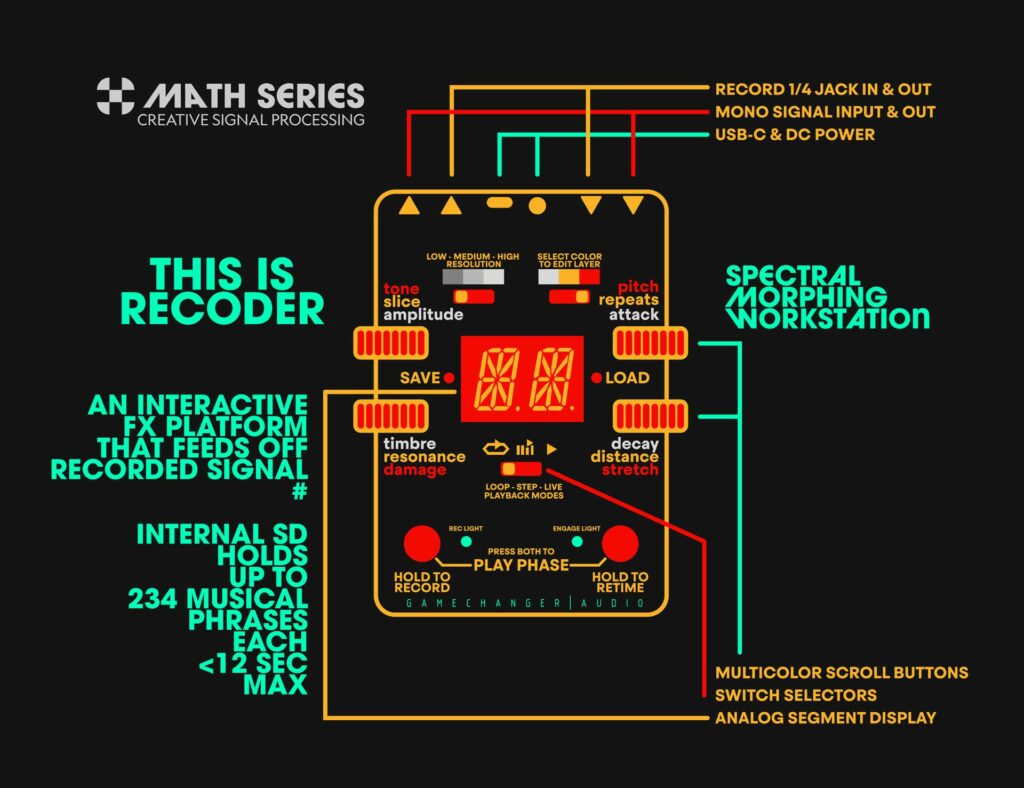
HOW IT WORKS
ENG
MATH
The RECODER is an interactive phrase-based effect generator. It doesn’t just play back what you record – it injects it into your sound. Every phrase you capture can be saved permanently inside the pedal, stored in one of 234 memory slots – along with all its customized parameters, layers, mangles, and mutations.
At its core, the RECODER is designed for single-input recording and processing. Plug your instrument into the Main Input — guitar, synth, voice, drum machine, acoustic pickup, modular — and you can do absolutely everything:
-
-
-
- Record a phrase by holding down the REC footswitch
- See it captured via the circular LED display (one light = one second, up to 12 seconds)
- Watch it start looping immediately after release
- Play your instrument through it — hearing your live signal interpreted, reshaped, filtered, sliced, and harmonically re-mapped through that phrase
-
-
Short recordings (50–200 ms) behave like spectral filters, resonators, or timbral imprints. Long recordings become living rhythmic maps, transient machines, vowel vocoders, spectral landscapes, ghost riffs inside your clean sound.
Now, about that second input…
The Record Input allows you to record external donor material from a different source in real time while still playing through your main instrument. That means you can create hybrid phrases from different sources without unplugging or stopping the flow, for example:
Play your guitar while recording your synth
Record a vocal vowel while already performing through a drum loop
NOW – LET’S FILL UP THE OXYGEN TANKS – AND TAKE A DEEP DIVE INTO THE FUNCTIONS
Rather than generating standardized presets, the RECODER performs adaptive spectral analysis—where results depend entirely on the recorded material.
Sample Duration Behaviors:
|
Sample Length |
Behavioral Role |
DSP Function |
|
50–200 ms |
Static spectral identity |
Timbral imprint, resonator, filter |
|
500–2000 ms |
Transitional modulator |
Formant warp, dynamic filtering |
|
4–12 sec |
Behavioral landscape |
Rhythmic convolution, transient-based slicing, spectral terrain |
Memory Architecture:
-
-
-
- 234 storage slots (phrase + DSP state container)
- Each slot stores: audio waveform, transfer profile, mutation state
- USB-C access for renaming, external phrase import, archival storage
- Secondary Input Real-Time Source Switching and Cross-Pollination
-
-
The Record Input is an optional acquisition, designed for real-time source switching, hybrid phrase creation, and continuous cross-pollination between multiple instruments.
It allows you to:
-
-
-
- Record an external donor signal while maintaining uninterrupted live processing
- Inject new spectral material mid-performance
- Construct hybrid phrase models from multiple sources (guitar + synth, vocal + drum machine, etc.)
- Perform dynamic modulation switching without unplugging or re-routing
-
-
LIVE MODE
In LIVE MODE, the engine continuously analyzes incoming audio (from either input) and uses it as a real-time modulation source — bypassing static phrase playback.
This enables:
-
-
-
- Continuous spectral substitution
- Live-time convolution, slicing, sidechaining, harmonic mirroring
- Instrument-to-instrument morphing without recording stops
- Behavioral streaming instead of static looping
-
-
WHITE LAYER
ENG
MATH
The White Layer is all about taking your dry signal and infusing it with the behavior, movement, and personality of the recorded phrase. This layer has four main controls:
AMPLITUDE
Multiband Dynamic Transfer
-
-
-
- Turn left – subtracts the most active frequencies
- Turn right – boosts those active bands, acting like a living multi-band booster
-
-
BANDWIDTH SWITCH
This switch changes how finely the amplitude and timbre transfers interpret your dry signal:
|
Setting |
Behavior |
Feel |
|
LOW |
Wide, chunky spectral bands |
Thick, raw, lo-fi, expressive |
|
MEDIUM |
Partial spectral resolution |
Balanced, musical, textured |
|
HIGH |
Full FFT spectral resolution |
Micro-detailed, surgical, |
TIMBRE
Spectral Fingerprint Transfer. It can turn a dry guitar into a bowed string section, a broken tape machine, or a detuned choir of frozen oscillators — depending on what you fed it.
-
-
-
- Turn left – FFT vocoder-style imprint (grainy, ghostly, responsive)
- Turn right – Additive resynthesis (cleaner, harmonic, melodic)
-
-
ATTACK & DECAY
Feel the Response Curve. These two knobs control how responsive, smooth, or sharp the transfer feels.
-
-
-
- Attack: how quickly the Recoder reacts to your playing
- Decay: how long it “holds onto” the phrase before morphing to the next moment
- Attack: how quickly the Recoder reacts to your playing
-
-
|
PARAMETER |
DSP PROCESS |
FUNCTION |
|
AMPLITUDE |
Multiband Energy Transfer |
Envelope shaping, harmonic amplitude imprint |
|
TIMBRE |
FFT / Additive Spectral Transfer |
Spectral envelope, formant & timbral remapping |
|
ATTACK |
Envelope Sensitivity Control |
Time-domain threshold responsiveness |
|
DECAY |
Temporal morph length between bins |
AMPLITUDE
Multiband Convolutional Dynamics. Translates amplitude envelope, energy distribution, and transient clustering of the recorded phrase onto a live signal.
-
-
-
- Left – Frequency-band attenuation based on donor signal activity
- Right – Active-band boost, generating spectral side-drive, and phrase-driven distortion
-
-
DSP mapping equation: LiveOutputFreqₙ(t) = DryInputFreqₙ(t) × EnergyProfileₙ(recorded, t)
BANDWIDTH
Resolution / Time-Frequency Granularity Control. Controls how finely the input is sliced for transfer:
|
Mode |
Band Count |
DSP Resolution |
Application |
|
LOW |
~16 bands |
Coarse spectral mapping |
Vintage, dirty, resonant |
|
MEDIUM |
~64 bands |
Partial FFT decomposition |
Musical, smooth, articulate |
|
HIGH |
up to 1024 bands |
Full STFT spectral reconstruction |
Precision vocoding, formant analysis |
TIMBRE
Spectral Envelope Transfer. Extracts the average harmonic distribution, formant clusters, and band energy of the recorded phrase and imposes it onto the dry signal — while preserving original performance dynamics.
-
-
-
- Left – FFT vocoder engine.
- Right – Additive resynthesis and harmonic redistribution.
-
-
Spectral transfer model: DryOutputFreqₙ(t) = DryInputFreqₙ(t) × SpectralEnvelope(recorded, n)
ATTACK/DECAY
Temporal Morph Calibration. This is a behavioral smoothing tool between spectral frames — blending from single-frame imprinting to fluid response morphing. In the White Layer, dry signal is behaviorally resynthesized.
-
-
-
- Attack – Initial transient responsiveness
- Decay – Hold time before spectral transition
-
-
YELLOW LAYER
ENG
MATH
The Yellow Layer allows parts of the actual recorded material to start leaking into your output as an additional moving layer of sound.
SLICES
Extracting little shards of the recorded phrase
-
-
-
-
-
-
- Turn to the right – slices sound musical, sympathetic, harmonically aligned with what you play.
- Turn to the left – slices become unpredictable, dissonant, metallic, glitchy, broken, alien — based on the differences between your playing and the phrase,
-
-
-
-
-
RESONANCE
Real-time harmonic blooms from the recorded phrase
Resonance analyzes the pitch and harmonic content of your recorded phrase and creates artificial boosted resonances on top of your dry signal.
-
-
-
- Turn to the right – the resonances follow what you’re currently playing, but shaped by the phrase’s tonal DNA.
- Turn to the left – the resonances are locked inside the phrase, regardless of what note you’re playing – creating strange harmonic overlays that sometimes agree, sometimes fight you — sometimes sound like your instrument is being haunted.
-
-
REPEATS & DISTANCE
Time-based mutation of those slices and resonances
Once Slices and Resonances are triggered, these two knobs decide how they behave in time.
|
Control |
What it does |
|
REPEATS |
How many times those fragments are repeated — from one single blink to long, blooming, ambient tails |
|
DISTANCE |
How widely spaced or tightly clustered those fragments are — like shattered glass vs flowing mist |
Phrase-Extractive Sound Generation
In this layer, the recorded phrase is no longer just a modulator —
It becomes an active audio source that gets extracted, triggered, and reconstructed in real time.
|
PARAMETER |
DSP ROLE |
DESCRIPTION |
|
SLICES |
Spectral Triggering |
Extracts harmonic bins based on similarity/difference with live input |
|
RESONANCE |
Convolution Resonator |
Artificial resonance generation, phrase-locked or performance-locked |
|
REPEATS |
Temporal Feedback |
Controls phrase-fragment persistence (feedback / decay) |
|
DISTANCE |
Time Spacing |
Sets distribution between triggered spectral events |
SLICES
Spectral slice extraction and triggering based on live input.
Right: adaptive, harmonic-matching slice triggering (sympathetic, musical)
Left: contrast-triggered spectral debris (dissonant, glitch-like, metallic)
Slices are spectral bin activations based on match/mismatch between the recorded phrase and the live input.
RESONANCE
Convolution-based resonance generation, derived from the recorded phrase. Two operational modes:
|
Mode |
Description |
|
Performance-locked |
Resonances follow live input but use spectral DNA of recorded phrase |
|
Phrase-locked |
Resonances emerge directly from the recorded phrase timeline — independent of live pitch |
Resonance operates on extracted formants, spectral clusters, and harmonic peaks — not traditional EQ bands.
REPEATS & DISTANCE
Temporal Dispersion Engine
Once slices or resonances are triggered, these two parameters control how they populate time.
|
Parameter |
Function |
|
REPEATS |
Controls decay, persistence, and feedback coefficient |
|
DISTANCE |
Controls temporal clustering — tight (percussive) or wide (ambient) |
Behavior is fully phrase-dependent — time-based effects are generated reactively based on spectral content, not predefined delay/reverb algorithms.
RED LAYER
ENG
MATH
The Red Layer mutates the recorded phrase.
TONE
The TONE knob is not a standard EQ, it’s a spectral tilt engine that picks its own center frequency – based on what you recorded.
Turn it one way: it pulls the phrase into bright, shimmering, metallic textures.
Turn it the other: it warms, darkens, fattens, and muddies the phrase – almost like pulling a blanket over it.
DAMAGE
Left side: bit reduction, digital degradation, crunchy broken-speaker beauty.
Right side: full-on wavefolding – shredding the phrase into aggressive, harmonic-dense chaos.
PITCH
Turn the Pitch knob to drop or lift the entire recorded phrase by up to 4 octaves – but here’s the twist: the timing doesn’t change.
You get time-corrected pitch shifting, meaning you can record a tiny pinch harmonic and drop it down all the way to a rumbling thunder — without stretching or slowing it.
STRETCH
This is Time-stretching of the recorded phrase but fully separated and decoupled from pitch.
The Red Layer operates upstream of all modulation and convolution engines.
Controls in this layer directly alter the recorded phrase data before it is used for:
-
-
-
-
-
-
- Spectral transfer (Amplitude, Timbre)
- FFT bin triggering (Slices)
- Convolution resonance generation
- Transient and segment extraction
- Time-based effect generation (Repeats / Distance)
-
-
-
-
-
|
Control |
Domain |
Key Function |
|
TONE |
Spectral |
Energy distribution tilt using adaptive pivot (centroid) |
|
DAMAGE |
Non-linear |
Bit-depth reduction or wavefolding, destructive spectral corruption |
|
PITCH |
Spectral |
Bin remapping, time-invariant transposition, phase-preserving |
|
STRETCH |
Temporal |
Time scaling, transient reallocation, pitch-independent |
TONE
Auto-Weighted Spectral Tilt applies a slope across the spectrum of the recorded sample by analyzing its spectral centroid (calculated per recording) and using it as a dynamic pivot frequency.
DSP Behavior:
Computes spectral centroid: SC = Σ(f × A(f)) / Σ(A(f))
Applies upward or downward gain bias across all FFT bins relative to SC
No static frequency band definitions; pivot point recalculated per phrase
|
Rotation |
Effect |
|
CCW |
Low-bin gain bias (low-end emphasis, attenuation of high-frequency bins) |
|
CW |
High-bin gain bias (high-end emphasis, attenuation of low-frequency bins) |
DAMAGE
Bit Reduction / Wave folding in two distinct DSP behaviors depending on knob direction.
|
Rotation Range |
DSP Model |
Description |
|
Left (0–50%) |
Bit depth reduction + downsampling |
Quantization noise, transient chopping, alias content generation |
|
Right (50–100%) |
Wavefolding / high-gain nonlinear shaping |
Harmonic multiplication, spectral folding, phase reflection artifacts |
Key details:
-
-
-
- Performs non-linear destructive transforms directly on stored phrase buffer
- Alters bin magnitude and bin relationships, affecting all downstream spectral processes
- Prevents post-runtime smoothing — destructive by design
-
-
PITCH
Time-Corrected Pitch Transposition applies global pitch shift to stored phrase across ±4 octaves, preserving original sample duration.
DSP Method:
Time-preserving pitch transposition (phase vocoder / complex FFT bin remapping)
Reallocates bin indexes according to:
f_new = f_original × 2ⁿ where n ∈ [-4, +4]
Maintains transient position and phrase duration
Optional formant preservation depending on DSP mode
Impact:
-
-
-
-
-
-
- Changes harmonic relationships across bins
- Affects Slices trigger conditions
- Re-maps Resonance peak alignment
- Alters phrase’s spectral content before transfer
-
-
-
-
-
STRETCH
Time-Domain Compression / Expansion performs temporal scaling of the recorded phrase without affecting pitch.
DSP Method:
Granular OLA (Overlap-Add) or PSOLA-style processing
Time scaling according to stretch factor S:
Samplenew(t)=Sampleoriginal(t/S)Sample_{new}(t) = Sample_{original}(t / S)Samplenew(t)=Sampleoriginal(t/S)
Where:
S < 1 = Compression (shorter, denser phrase)
S > 1 = Expansion (longer, smeared phrase)
Consequences:
|
Stretch Effect |
Result |
|
Compression (<1.0) |
Transients become denser, rhythmic information accelerates |
|
Expansion (>1.0) |
Transients are spaced apart, introduces smear, spectral drift |
|
Extreme expansion |
Phrase becomes ambient granular field |
Functional Impact:
-
-
-
-
-
-
- Alters time alignment of transient markers
- Alters convolution timing behaviors
- Changes Slices trigger density and gate spacing
- Affects Repeats/Distance time-domain processing
-
-
-
-
-
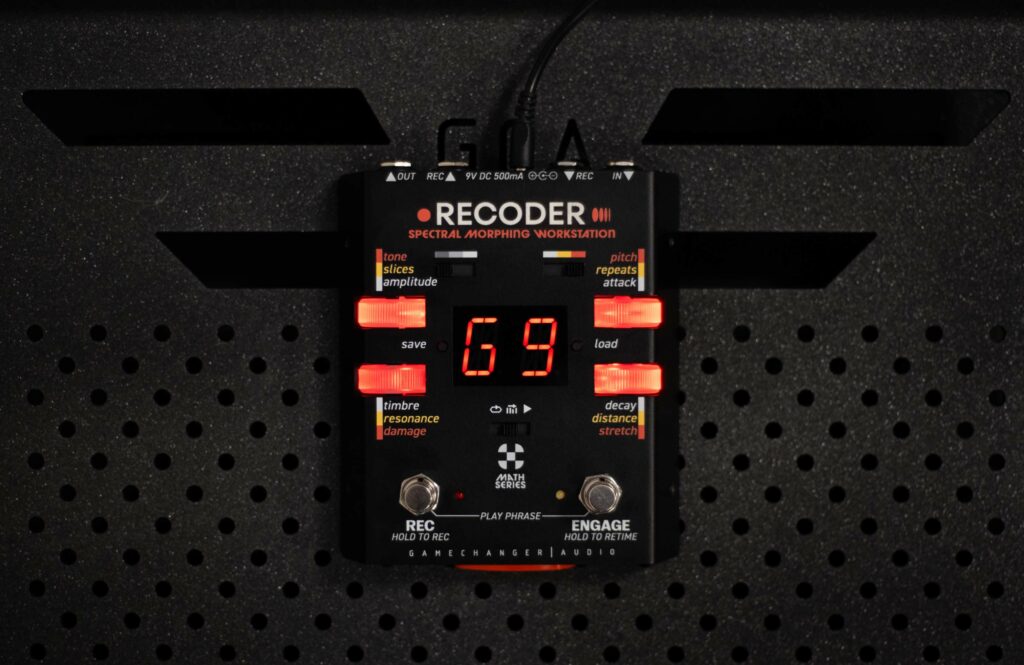
FOOTSWITCH
ENG
MATH
RECORD
Press and hold the REC footswitch to start recording.
Recording starts as long as the switch is held down and stops when you release it.
The circular display shows the passing of time — one segment = one second.
Maximum recording time is 12 seconds, but the recorded phrase can be as short as you like — even less than one hundred milliseconds.
Short captures behave like static filters, timbre captures, resonators, glitch artifacts.
Long captures become looping “landscapes,” rhythmic machines, spectral vocoders, ghost riffs, etc.
PLAY PHRASE
Press both footswitches at the same time (REC + ENGAGE) and the RECODER will play the phrase directly through the output — without any manipulation or modulation.
PHRASE RETIME
This is a clever shortcut for quickly re-timing or “stretch-aligning” the recorded phrase to match what you are playing now without changing pitch, stretch values, or any of the spectral content.
RECORD
REC footswitch (hold-to-record) initializes audio capture directly into the phrase buffer.
Recording starts at footswitch press, stops at release.
-
-
-
- Maximum buffer length: 12.0 seconds, represented by 12 LED cursor segments (1s each).
- Minimum viable capture length: <100ms, suitable for static spectral imprint, filter behavior, formant transfer, or resonance sources (low temporal variance)
-
-
Recorded content is immediately:
-
-
-
- Written to phrase buffer (RAM) as time-indexed waveform data
- Converted to FFT frame bank (spectral representation)
- Indexed for transient markers, phase continuity, and segment boundaries
- Prepared for Amplitude Transfer, Timbre Transfer, Slices, Resonance, and Time-based engines
-
-
PLAY PHRASE
Direct Phrase Playback (Buffer Monitoring Mode) is triggered by pressing REC + ENGAGE footswitches. Record controls the initial data population of the spectral engine. It simultaneously bypasses all White/Yellow modulation layers and routes raw phrase buffer output directly to main output, Output is pre-processed by Red Layer (Pitch, Stretch, Damage, Tone), since these affect phrase data upstream of playback.
Used for:
-
-
-
-
-
-
- Verifying phrase capture integrity
- Monitoring Red Layer sample mutation effects
- Creating static drones, sample loops, and phrase-based textural layers
-
-
-
-
-
Technical Behavior
|
Process |
Data Source |
|
Playback |
Raw phrase buffer (post-Red Layer) |
|
Output routing |
Dry bypass, direct buffer stream |
|
Internal state |
No modulation, no slicing, no spectral transfer |
“Play Phrase” is a buffer audition mode, not a modulation state.
PHRASE RETIME
Time Alignment Without Pitch Alteration is activated by holding ENGAGE footswitch for ≥ one beat duration (user-defined). System measures physical hold time (T_hold) and remaps phrase buffer traversal rate to match current tempo intent.
Mathematically: New playback rate R_new = PhraseLength / T_hold
This modifies the playhead velocity through the spectral buffer but does not alter:
|
Not Affected |
Notes |
|
Pitch |
No transposition (Pitch knob unaffected) |
|
Stretch values |
Time-stretch DSP unaffected |
|
FFT frame content |
Spectral identity preserved |
|
Segment boundaries |
Same transient locations |
Functional result:
-
-
-
- Preserves pitch, stretch, formant, spectral signature
- Only modifies temporal speed of phrase traversal
- Syncs modulation sources (slices, amplitude transfer timing, resonance cycling) to user-defined playback tempo
- Retime = Time-domain scaling of phrase position indexing
without affecting spectral data, pitch, or stretch processing.
-
-
PLAY MODES
ENG
MATH
This selector determines how the RECODER “reads” and interprets the recorded phrase.
In other words, how the internal playhead moves across your saved material.
LOOP
In LOOP mode, the recorded phrase is constantly spinning inside the engine like a circular buffer. The playhead continuously cycles through the phrase, over and over again.
The playback speed, resolution, and pitch of the phrase (how fast or how slow the playhead moves) is completely up to you — depending on how you set the controls (Stretch, Pitch, Retime).
ADVANCE
Instead of constantly looping, the RECODER analyzes the recorded phrase and splits it into segments based on transients and pitch changes — like tiny “phrase markers” or event points.
The playhead only advances when you trigger it with your playing. Each time you strike a note or hit a transient, the engine jumps to the next slice, segment, or pitch zone in the recorded phrase.
LIVE
In LIVE mode, the RECODER stops using saved phrases as the input source – and instead, it uses your live signal as the phrase donor.
The playhead only advances when you trigger it with your playing. Each time you strike a note or hit a transient, the engine jumps to the next slice, segment, or pitch zone in the recorded phrase.
Play Modes determine how the RECODER reads and navigates the recorded phrase buffer.
They do not change the phrase itself — they only change how the internal playhead moves through it, and whether the system relies on the stored phrase or the live input as its data source.
There are three play modes: LOOP, ADVANCE, and LIVE.
Below is a direct technical breakdown of each — no metaphors, no marketing tone.
LOOP MODE
In Loop mode, the recorded phrase is treated as a circular buffer. Once recorded, the phrase is continuously played back from start to end, at a speed determined by Stretch, Pitch (time-preserved), or phrase retiming. There is no transient-based segmentation, and no event-triggered advancement — the buffer is simply read in a linear continuous scan, wrapping at the end.
The playhead follows a uniform linear time index:
Position p(t) = (t × Rate) mod N
where N is phrase length and Rate is playback speed.
The data from the phrase is continuously available to all spectral engines — Amplitude Transfer, Timbre Transfer, Resonance, Slices, and Time-based effects. This is the only mode where the phrase plays without being triggered.
Loop = phrase-driven modulation using time-indexed playback.
ADVANCE MODE
Advance mode does not continuously scroll through the phrase. Instead, it analyzes the recorded sample and divides it into segments using transient detection, pitch change analysis, or amplitude change markers. The playhead in Advance mode stays stationary at the current segment until triggered by live input events — typically transient attacks or note onsets.
The engine identifies segment boundaries at record time using:
-
-
-
-
-
-
- Onset detection (amplitude spikes)
- Zero-crossing analysis
- Pitch transition mapping
-
-
-
-
-
During playback, the phrase only advances when:
-
-
-
-
-
-
- A new transient is detected in the live input
- The input crosses a spectral/energy threshold (controlled by Sensitivity)
-
-
-
-
-
This mode does not scan through time — it moves event by event. The phrase is treated as a sequence of frames, not a timeline.
Advance = phrase-driven modulation using input-triggered segment stepping.
LIVE MODE
In Live mode, the recorded phrase is not used as the input spectral donor. Instead, the pedal continuously analyzes the live input signal in real time and passes it directly into the spectral engines (Amplitude Transfer, Timbre Transfer, Slices, Resonance) without waiting for storage or looping.
The phrase buffer is still available if you decide to record — but in Live mode, the modulation sources are fed directly from real-time FFT analysis, not from any stored phrase.
-
-
-
- FFT frames are generated from live input continuously
- No ring buffer traversal
- No segment-based navigation
- No looping — input overwrites spectral source every frame
- Red Layer parameters (Pitch, Stretch, Damage) affect stored phrase, not Live input
-
-
Live = instantaneous spectral resynthesis, no playback.
GLOBAL SETTINGS
ENG
MATH
Sensitivity: how reactive the Recoder is to your playing, how easily slices trigger, how ADVANCE mode steps through the phrase, how soft or aggressive the transient detection is.
Slot State Setup: defines how presets behave: whether Slots store just settings or also the recorded phrase, whether mutations like Pitch and Stretch are saved, whether the pedal always boots into the last-used Slot, etc.
MIDI: choose the MIDI channel, assign CC or Program Change, and decide which parameters can be controlled externally (Pitch, Stretch, Damage, Record, Load, Play Phrase, etc.). No forced templates – you assign what matters.
Footswitch behavior: define whether Play Phrase is momentary or latch, whether Retime is quantized or free, whether Record overwrites or keeps the last sample.
System settings: LED display mode, USB behavior, boot Slot, Live mode on/off, and other small but practical things.
This layer does not process audio. It defines system behavior: buffer handling, event thresholds, preset logic, and external control routing.
Sensitivity: Sets transient detection threshold and input amplitude floor for triggering Slices, ADVANCE stepping, and RETIME alignment. Adjusts envelope follower response and detection speed.
Slot State Setup: Defines whether Slot memory stores Phrase data only. Also selects boot Slot behavior and Slot overwrite rules.
Phrase + Red Layer mutations (Pitch, Stretch, Damage, Tone)
Full state (phrase, mutations, parameter positions)
MIDI Mapping: Selects MIDI channel, assigns CC or PC to system parameters (Record, Load, Play Phrase, Pitch, Stretch, Slices, Resonance, etc.). No fixed template — all controls manually assignable.
Footswitch Logic: Configures momentary/latching behavior, REC overwrite mode, RETIME quantization, Live Mode activation.
System Preferences: USB mode (storage vs operational), LED display type (time display, bin activity, amplitude), boot Mode, and global vs Slot-based mutation storage.